Use casesRemote interpreting
Video and phone interpreting, from IMP
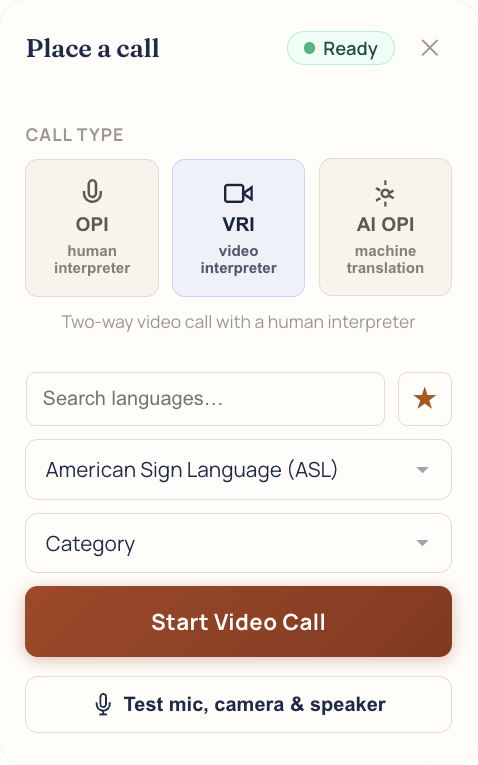
Start a VRI or OPI call from the Place a call window. Your interpreters are offered it in IMP, and overflow coverage can back them up on live calls.
Scheduling, dispatch, billing, and payments in one system, built for interpreting.


However your agency works: by setting, by service, or by the languages you cover.
Start a VRI or OPI call from the Place a call window. Your interpreters are offered it in IMP, and overflow coverage can back them up on live calls.
A live call, start to finish.
Each one links to the full details.
VRI and OPI with a person, or AI OPI for routine spoken-language calls.
Read moreASL, CDI, CART, and TypeWell are offered on video calls only.
Read moreAfter a delay you set, a live call can be offered to the IMP Interpreter Network too.
Read moreCheck the mic, camera, and speaker from the same window.
Read moreOn either plan, with call minutes in the VRI/OPI Usage report.
Read moreBook a video job ahead like any other job, with its own time zone.
Read more
Something else? Bring it to the demo.
A browser with a camera and microphone for video, or a microphone for phone calls. The call window can test the mic, camera, and speaker first.
Your interpreters' languages. ASL, CDI, CART, and TypeWell are offered on video only. With overflow on, the IMP Interpreter Network covers ASL on video, and Spanish and French on video and phone.
Per minute, on either plan.
Machine translation for routine spoken-language calls. It is the AI Translator, billed per minute.
It starts with one question: is a signed language involved? Our blog post walks through the rest.
We'll book it in IMP with you, start to finish.