
All of IMP

Email notifications

An email template for each event, merge tags that fill in the details, and your own Reply-To address. Push notifications follow on the web, iOS, and Android.

EventInterpreter confirmedJob TIA-J512
Thornbury Interpreting Agency9:02 AM
Assignment Confirmed: American Sign Language on Thu, Oct 8

Hi Alicia, you're confirmed for TIA-J512. Full details are in the app. Reply to this email with any questions.

Reply goes to scheduling@thornbury.example
IMP
Job confirmedASL, Thu, Oct 8
Logged: email and push sent to Alicia Tran

An example based on the demo agency's Interpreter Confirmed template
An email for each event

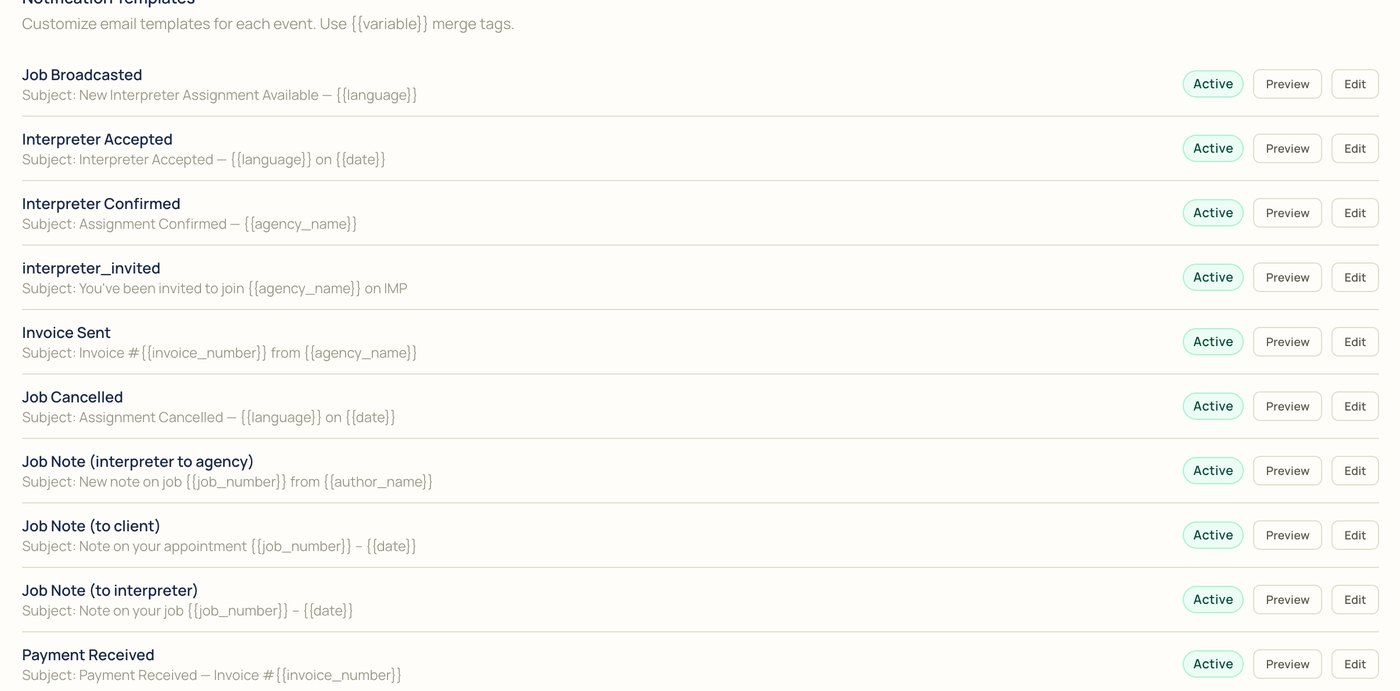
Seventeen events each have their own template, from a job broadcast to a payment received. Each one can be previewed, edited, and switched on or off.

123
Notification templates: job broadcasted, interpreter accepted, interpreter confirmed, interpreter invited, invoice sent, job cancelled, job notes to the agency, client, and interpreter, payment received, request approved, pending, and rejected, ticket opened, and more, each marked Active with Preview and Edit
1

Active. Whether the template sends.

2

Preview. See it before it goes out.

3

Edit. Change the subject and the message.

Merge tags fill in the details

Write a template once. Tags in double curly braces are swapped for the job, the account, and the people involved when each email goes out.

{{language}}{{date}}{{job_number}}{{agency_name}}{{invoice_number}}{{author_name}}{{ticket_number}}{{subject}}

Tags seen in the demo agency's templates

TemplateInvoice Sent
Subject: Invoice INV-00002 from Thornbury Interpreting Agency

Example of a template filling in

Sent in your name, answered by you

Emails work from day one through IMP's shared sender, with replies going to your Reply-To address. Verify your own domain to send from it, or connect your own email provider.

Email configuration: supports SMTP for Gmail, Outlook, or custom, SendGrid, Resend, and Amazon SES, with provider, enabled, and API key fields
Email providers, in Settings
Sending domain: emails already send through the shared sender with replies routed to your Reply-To; verify your own domain with a one-time DNS setup
Your own sending domain
  • Shared senderWorks right away. Replies go to your Reply-To address.
  • Your own domainA one-time DNS setup, better for branding and deliverability.
  • Your own providerSMTP for Gmail, Outlook, or custom, SendGrid, Resend, or Amazon SES.

Beyond the inbox

The other ways IMP keeps people in the loop.

  • Push notificationsOn the web, iOS, and Android. Emails to interpreters are mirrored as push notifications, and pushes leave out the client name.
  • RemindersConfirmed interpreters get a reminder about two hours before the job.
  • Text messagesThe AI Receptionist texts staff on urgent calls and sends call summaries and dispatch updates.
  • Email BlasterPick open jobs, choose columns, and copy a table into an email to your interpreters.
  • Pay statement emailsOff by default. Interpreters see their statements in the app either way.
  • A log of what went outIMP keeps a record of the notifications it sends.

Notification questions

Something else? Bring it to the demo.

Which events send email?

Each of the 17 events has its own template, like a job broadcast, an interpreter confirmed, a job cancelled, an invoice sent, a payment received, and a request approved or rejected.

Can I change what the emails say?

Yes. Edit each template, and use merge tags like {{language}} and {{date}} for the details.

Whose address do emails come from?

IMP's shared sender, with replies going to your Reply-To address, or your own domain once you verify it.

Can I use my own email provider?

Yes: SMTP for Gmail, Outlook, or custom, SendGrid, Resend, or Amazon SES.

Do interpreters get push notifications too?

Yes, on the web, iOS, and Android, including a reminder about two hours before a job.

Are pay statement emails sent?

Only if you turn them on. Interpreters see their statements in the app either way.

Is there a record of what went out?

Yes. IMP keeps a log of the notifications it sends.

Bring a real request to the demo

We'll book it in IMP with you, start to finish.

