Routine spoken-language calls
- Confirming or moving an appointment
- Quick questions and directions
- Billed per minute, on either plan
Scheduling, dispatch, billing, and payments in one system, built for interpreting.


However your agency works: by setting, by service, or by the languages you cover.
AI interpreting for routine spoken-language calls, started from VRI/OPI Call in IMP and billed per minute on either plan.
An example call. The bubbles show what each person hears.
AI Translator handles everyday spoken-language conversations. When a conversation needs a qualified interpreter, start a video or phone call with one of your interpreters instead.
The examples in each list are suggestions. Your agency decides when to use which.
IMP won't put an ASL, CDI, CART, or TypeWell request on an AI Translator call or any other audio-only call. Those stay on video with a person.
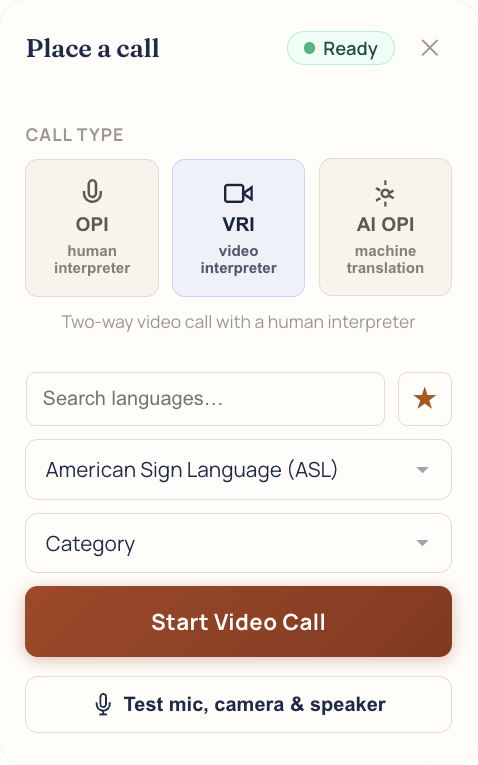
The same button your team uses for video and phone interpreting. Pick the AI option, and the call is billed per minute like any other call placed through IMP.
Open VRI/OPI Call at the top of IMP.
Choose AI OPI, the machine translation option, for a spoken-language call.
Talk. Each side hears the other in their own language.

 2
2The VRI/OPI Call button and the Place a call window in IMP
Something else? Bring it to the demo.
Spoken-language calls. IMP won't put an ASL, CDI, CART, or TypeWell request on an AI Translator call.
Per minute, on either plan. We'll go over rates in the demo.
No. It works on either plan and is billed per minute.
No. Overflow covers video and phone calls answered by interpreters.
From VRI/OPI Call at the top of IMP.
We'll book it in IMP with you, start to finish.